/dev/gav

C64UserGuideI have been memed.

How old were you when you started programming?

10

How did you get started in programming?

I was a fresh faced young thing of 9 when my sister and I received a Commodore64 for Christmas. Incredibly after a few months I got tired of the assortment of games that we had. As luck would have it the amazing machine came bundled with the Commodore 64 MicroComputer User Manual which included more than the average User Manual will these days. That book taught me how to make my C64 do things! Soon I was making the most awful noises and random series of images flashing across the screen. It was possibly the best Christmas present ever.

What was your first language?

C64 BASIC

What was the first real program you wrote?

I’d have to say my synthesiser would be it, I had worked out how to program the SID chip built into the C64 and wired up some code to read what key was being pressed and then played a corresponding note.

What languages have you used since you started programming?

Visual Basic, Classic ASP, SQL, PL/SQL, JavaScript, C#, Java including J2EE, HUGS, PROLOG, Modula2, C, and pile of frameworks that have their own languages or XML vocabularies.

What was your first professional programming gig?

Writing VBA to connect an Access based contact database to some Excel documents, saving the office lady at least 20 minutes every time the client got a new work request, not to mention reducing data errors due to the removal of the Alt+Tab integration layer. 

If you knew then what you know now, would you have started programming?

Absolutely, I probably would have pursued it as a career option sooner too!

If there is one thing you learned along the way that you would tell new developers, what would it be?

Don’t look for the ‘perfect answer’ to a given question. Look for the answer that best suits the needs of the client because at the end of the day our job is ultimately about how well can we make life better for them.

What’s the most fun you’ve ever had… programming?

For me the the best thing about this job is the people, it’s one of the reasons I love working at Intergen. The people make it a place that I want to be. Sure the challenges of solving tough technical issues are great and highly rewarding but for me the people make it really worthwhile. Be it knowing the shared pain of a hellish project or the healthy debate of GUIDs v.s. auto incrementing integers as keys the people make this industry what it is.

I choose

    Posted in Development, General, Intergen | Leave a comment

    Method Names of Excellence!

    Just had a great giggle and a shudder after my workmate Henrik showed me some code that is the latest check-in for a project, and I assume running on a site out there.

    protected void Page_Load(object sender, EventArgs e)
    {
    	if (Request.QueryString["QueryStringKeyOfAwesomeness"] != null)
    	{
    		ThisWillBeEmbarrassingOneDay();
    	}
    }
    

    Inside the same class we have methods with such glorious names as:

    • DoSomeMoreTrippyStuffOggaOgga()
    • DoSomeCrazyAssDataUpdatesV2Awesome()
    • DoJDMagicalSuperUpgradeWOotWOt()

    Somewhat disturbing that the ThisWillBeEmbarrassingOneDay() can still be run on the live site if you know the magical key, but those method names, wow!

    What is the craziest method name that you have encountered?

    Posted in Development, Intergen, WTF | 1 Comment

    Paul Andrew from the SharePoint Team in Wellington New Zealand

    Chan has just announced that Paul Andrew is going to be visiting us here in Wellington, New Zealand and presenting to the SharePoint Users Group 🙂

    This special event will be held in Xero offices 5pm Friday 27 June 2008. Yes, it’s a Friday, but as usual there will be pizza and drinks plus the chance to grill one of the Product Manager for the SharePoint team 😉

    I’ve worked with for Paul on a couple of projects that Intergen have done for Microsoft now. I’d say that the session that he is going to present will be focused on VSeWSS 1.2, this being the Visual Studio 2008 compatible version of VSeWSS 1.1.

    Please register your interest by RSVP to kirkj@paradise.net.nz and wlgspug@sharepointservices.net.nz

    Hope to see plenty of you there 🙂

    Posted in Development, SharePoint, VSeWSS | Leave a comment

    Gah, F Lock!

    I’m love my Microsoft Natural Ergonomic keyboard it’s comfortable to use and I’m much faster and more accurate then using a regular flat keyboard. While I like some of the ‘extra features’ that the Microsoft Office keyboards have, like the volume control and handy shortcut buttons, I utterly loathe this F Lock thing!

    Every single function that is mapped as an alternate F key setting has a keyboard shortcut already, which I know and use. But my main frustration is that by default the setting is that the F keys don’t do F key stuff 😡

    However there is relief if you, like me, hate having to remember to toggle the setting every morning when you boot up. Jason Tsang has a fix which changes some registry settings to flip the meaning of the F Lock key: http://jtsang.mvps.org/scancode_method.html

    Posted in General, Tools | Leave a comment

    Blog This in Windows Live Writer!

    Ok, so I’m a Firefox fanboy and almost never use IE or Internet Exploder as I most often refer to it.

    I just happened to be using IE when I decided to write my last blog post about the release of VSeWSS 1.2 when I discovered this gem:

    blog-in-wlw

    What a great wee feature. It automatically sets the title of the new posting to that of current page in the browser and inserts a link to that page into the body of the posting.

    Nice work from the Windows Live Writer team. I wonder how hard it would be to implement at Firefox add-on for the same functionality?

    Posted in Tools | Leave a comment

    Microsoft SharePoint Team Announces the VSeWSS version 1.2!

    Excellent! Now all you SharePoint developers out there using VSeWSS who are itching to start using Visual Studio 2008 can do so :o)

    Read the full details in a posting the SharePoint Team Blog from Chris Johnson (another kiwi flying high at Redmond): Microsoft SharePoint Team Blog : Announcing the VSeWSS version 1.2!

    Posted in SharePoint, Tools, Visual Studio, VSeWSS | Leave a comment

    SharePoint Navigation Elements: How to Code with them.

    I’m a pretty regular poster over on the MSDN SharePoint dev forum and one of the things that I see pop up every so often is questions about how to interact with the Navigation components that are built into SharePoint.

    Now you can fiddle with these through the web UI, but really, where is the fun in that? Not to mention the fact that I want software to alter my navigation elements as necessary.

    I’ve been working on a large piece of work, part of which includes the automated provisioning of Sites and Site Collections, so I got to spend a little time writing code to alter the navigational elements within my SharePoint instances.

    One thing that I’ve found a little annoying was that I couldn’t find a way to ensure that one of the lists in my site definition appeared in the Quick Launch bar, it would appear if I created the site through the UI, but not when I created the new site in code. 😐

    The solution:

    SPList submissionsList = newWeb.Lists["Submissions"];
    submissionsList.OnQuickLaunch = true;
    submissionsList.Update();
    

    Simply set the OnQuickLaunch property of the list, oh and make sure you call Update() 😉

    Ok, so what about inserting other links into the Quick Launch and Top Navigation? Luckily it’s pretty easy. The SharePoint object model provides us with the SPNavigationNode and SPNavigationNodeCollection classes.

    //get the quicklaunch and top nav for the target Web.
    SPNavigationNodeCollection quickLaunchNodes = targetWeb.Navigation.QuickLaunch;
    SPNavigationNodeCollection localTopNav = targetWeb.Navigation.TopNavigationBar
    

    Now SharePoint has a few smarts when it comes to navigation nodes, it contains the ability to create navigation nodes that will automatically update their target URL if the that URL maps to a location within the current site collection, this is acheived by passing false as the isExternal parameter in the constructor for the SPNavigationNode.

    //create the new node but have WSS maintain this link automagically
    SPNavigationNode newNode = new SPNavigationNode(newWeb.Title, newWeb.ServerRelativeUrl, false);
    

    Note that if the URL supplied in the constructor is for a location outside the Site Collection where this SPNavigationNode is to be held the you must pass true for the isExternal parameter, otherwise your code will throw an exception.

    Now that you have a new node you can add it directly to the SPNavigationNodeCollection that you wish to using either the AddAsFirst or AddAsLast methods but that’s not going to be all that useful if you want to maintain some form of order…. The SPNavigationNode class contains a Children property, which as you might guess is a SPNavigationNode collection! This notion of nested node collections is how the Quick Launch Bar maintains its orgainisation. So quite often you’ll actually want to find a particular node in the QuickLaunch or TopNavigationBar collections of nodes and add the new node as a child to the desired node.

    I created this helper method for this purpose and just made a couple of calls to add the new SPNavigationNode that I created earlier:

    //Add the new Navigation node to the QuickLaunch and the TopNav
    InsertNavigationNodeToCollectionAsChild(targetWeb, newNode, localTopNav, COURSES_NODE_TITLE);
    InsertNavigationNodeToCollectionAsChild(targetWeb, newNode, quickLaunchNodes, "Sites");
    
     private void InsertNavigationNodeToCollectionAsChild(SPWeb rootWeb, 
                                                              SPNavigationNode nodeToInsert, 
                                                              SPNavigationNodeCollection targetNodeCollection, 
                                                              string parentNodeTitle)
    {
         bool hasParentNode = false;
         foreach (SPNavigationNode node in targetNodeCollection)
         {
             if (parentNodeTitle == node.Title)
             {
                //Found the required parent node, add to it, 
                //set up our test variable, update and break from the loop
                hasParentNode = true;
                node.Children.AddAsFirst(nodeToInsert);
                node.Update();
                break;
            }
         }
         if (!hasParentNode)
         {
             //the desired parent node doesn't exist so create it ;o)
             //create as external so that no attempt to maintain is made by WSS
             SPNavigationNode coursesNode = new SPNavigationNode(parentNodeTitle, "", true);
      
             //add the parent at the end of the targetNodeCollection 
             targetNodeCollection.AddAsLast(coursesNode);
             coursesNode.Update();
             //Add our new site collection node to it's parent
             coursesNode.Children.AddAsFirst(nodeToInsert);
             nodeToInsert.Update();
         }
         //call update to make everything 'stick'
         rootWeb.Update();
    }
    

    Hope that someone out there finds this useful

    Posted in Development, SharePoint | 1 Comment

    User Guide for VSeWSS 1.1 released

    Microsoft have just released the full version of the user guide for VseWSS 1.1.

    For a little more information, read Paul Andrew’s blog post: http://blogs.msdn.com/pandrew/archive/2008/05/12/announcing-visual-studio-extensions-for-sharepoint-developer-user-guide.aspx

    Download if from: http://www.microsoft.com/downloads/details.aspx?FamilyID=A8A4E775-074D-4451-BE39-459921F79787&displaylang=en

    Also, take a look at the authors 😉

    Posted in Development, SharePoint, Visual Studio, VSeWSS | Leave a comment

    SharePoint fails at collaboration?

    What???

    Here at Intergen we run a series of late afternoon seminars for interested parties called Intergen Twilight Seminars. Last night we had a guest speaker, one Michael Sampson his session was based on his whitepaper: The 7 Pillars of IT-Enabled Team Productivity: The Microsoft SharePoint 2007 Analysis, where he states.

    On its own merits, SharePoint fails the needs of teams for collaborative software in 6 out of the 7 areas. It thus passes only one of the areas on its own merits, and it passes an additional two areas if the organization adds additional server software from Microsoft. However, using the software available from Microsoft, it earns a failing grade in 4 out of the 7 areas.

    WOW! That’s quite a claim. But let’s step back a moment here and look a the context. Michael is only looking at SharePoint with respect to Collaboration, that’s one portion of the SharePoint pie:

    The SharePoint Pie

    Fair enough, that’s his thing and it’s well worth evaluating the merits of SharePoint for collaboration, see as this portion of the pie is included in both WSS and MOSS. So let’s take a quick look at how Michael faults SharePoint.

    To talk about how SharePoint ‘fails’ I’ll just cover off Michael’s reference framework: The 7 Pillars of IT-Enabled Team Productivity

    • Pillar 1 … Shared Access to Team Data

    • Pillar 2 … Location-Independent Access to Team Data, People and Applications

    • Pillar 3 … Real-Time Joint Editing and Review

    • Pillar 4 … Coordinate Schedules with Team Aware Scheduling Software

    • Pillar 5 … Build Social Engagement through Presence, Blogs and IM

    • Pillar 6 … Enterprise Action Management

    • Pillar 7 … Broaden the Network through Automatic Discovery Services

    Now, Pillar 1 gets an out right pass, Pillars 3 and 5 receive passes when you add Office Communication Server to your environment.

    That’s 3/7, an outright fail overall!!! Who thought that SharePoint was that bad? I sure didn’t…

    It’s not.

    I’m going to talk about the two areas that Michael concentrated on during his presentation. Location independent access  and team aware scheduling.

    So Pillar 2, location independent access, that gets a fail because of the inability to use the client integration features in a offline mode and have seamless sync back once a network connection is restored.

    I ask you though, is that the responsibility of SharePoint, a SERVER product or Office, the client tool that is being used??

    I agree it’s not ideal if you have users that have to work with documents while they are offline. But why fault the server product and not the client tool? Maybe I’m blame shifting but either way it is something that Microsoft should look at improving in Office 14.

    For many organisations this is not going to be an issue as they’re not going to need this capability, or, in fact they might just accept this limitation as the number of impacted users is going to be insignificant. Michael did point out a product from a company called Colligo that does provide the automated online/offline sync capabilities that give this pillar a pass.

    The point of failure for Pillar 4, team aware scheduling, boils down to the fact that using team calendars in what Michael considers to be the ‘natural’ way breaks the Free/Busy features of Exchange server when importing those team calendars into a personal Outlook profile. Using the client integration means of importing when the appointment is only added to the team calendar causes the appointment to be stored on the PC on which that instance of Outlook is hosted instead of adding it to the shared Exchange hosted calendar.

    That’s pretty poor, however there is a simple work around, which is the way I suspect that this feature was designed to work, every SharePoint Calendar has its own email address….. So simply invite all the people you need at a given meeting and also invite the team calendar.

    So with a some investment and a little human factoring you can have SharePoint getting a respectable 5/7 pass on Michael’s Pillars framework. Let’s face it, IT enablers for business are an investment, spend wisely, engage the right people and ensure that you’re not spending money on things you don’t need. This pillars framework is a means of evaluating a product and how it aligns to your business needs and not a must have checklist.

    Posted in General, Intergen, SharePoint | Leave a comment

    Which version of VSeWSS is installed?

    I’ve just had  phone call from a colleague of mine asking if I knew how to tell which version of VSeWSS was installed on the machine he was using.

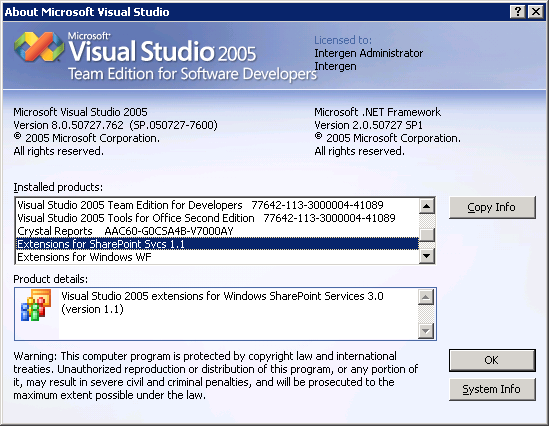
    All you need to do is pull up the About Visual Studio screen.

    So inside Visual Studio, Help > About Visual Studio

    Scroll through the installed components list until you find the Extensions for SharePoint Svcs entry

    The key thing to note here is that VSeWSS 1.0 displays no version number while 1.1 does:

    VSeWSS_version

    Posted in Development, SharePoint | 1 Comment